
Login:

This window appears if there is more than one user, or if there is only one user protected by a password.
Choose the desired user name, type the password if it exists, click "GO"
This window remains in English even when you change the language.
Password letters will appear in the form
of stars, to show letters click on the icon

In case you forgot your password:
Click

The administrator must have entered a valid phone number associated with your account, the text messaging service associated with your account must be active, and your device must be connected to the Internet.
If a phone number is not available for your account, the following message will appear:

Here you must be logged in as an administrator to change your password.
If the settings are entered correctly, the following window will appear:

The window tells you that a text message will be sent to your mobile with a confirmation code.
The code is a random four-character code.
Click "Send" to send the confirmation message.
After successfully sending the message, the message should reach your mobile phone. Enter the 4-character code in the space provided within one minute.
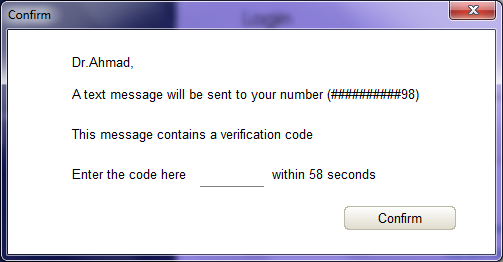
After a minute of sending without entering the code, you must repeat the process and send the message again with a new code.
After entering the code correctly, the password will be changed to the code entered, use the code as a password.
You can then change the password from the Control panel.
Login as administrator:
If you are the administrator, you can bypass entering passwords and login directly through any existing account.
Select an account
Click

Enter the admin password
You will be logged in through the specified user account.